(Read more about the launch of Voice Search in Latin American Spanish on the Google América Latina blog)
Today we are excited to announce the launch of Voice Search in Indonesian, Malaysian, and Latin American Spanish, making Voice Search available in over two dozen languages and accents since our first launch in November 2008. This accomplishment could not have been possible without the help of local users in the region - really, we couldn’t have done it without them. Let me explain:
In 2010 we launched Voice Search in Dutch, the first language where we used the “word of mouth” project, a crowd-sourcing effort to collect the most accurate voice data possible.The traditional method of acquiring voice samples is to license the data from companies who specialize in the distribution of speech and text databases. However, from day one we knew that to build the most accurate Voice Search acoustic models possible, the best data would come from the people who would use Voice Search once it launched - our users.
Since then, in each country, we found small groups of people who were avid fans of Google products and were part of a large social network, either in local communities or on online. We gave them phones and asked them to get voice samples from their friends and family. Everyone was required to sign a consent form and all voice samples were anonymized. When possible, they also helped to test early versions of Voice Search as the product got closer to launch.
Building a speech recognizer is not just limited to localizing the user interface. We require thousands of hours of raw data to capture regional accents and idiomatic speech in all sorts of recording environments to mimic daily life use cases. For instance, when developing Voice Search for Latin American Spanish, we paid particular attention to Mexican and Argentinean Spanish. These two accents are more different from one another than any other pair of widely-used accents in all of South and Central America. Samples collected in these countries were very important bookends for building a version of Voice Search that would work across the whole of Latin America. We also chose key countries such as Peru, Chile, Costa Rica, Panama and Colombia to bridge the divergent accent varieties.
As an International Program Manager at Google, I have been fortunate enough to travel around the world and meet many of our local Google users. They often have great suggestions for the products that they love, and word of mouth was created with the vision that our users could participate in developing the product. These Voice Search launches would not have been possible without the help of our users, and we’re excited to be able to work together on the product development with the people who will ultimately use our products.
Wednesday, March 30, 2011

Preview: Google Analytics Version 5
Our friends over at Marketpath uncovered a nice preview of Google Analytic’s next major release on YouTube. It appears this is largely a release that focused on the interface usability, but significant features have been added to custom reports and the dashboard.

Here’s the preview video from Justin Cutroni:
The news doesn’t quite make as big a splash as the Webtrends Version 10 release has, but it is great news for Google Analytics users. I often joke with my clients running Google Analytics that they could have paid less for a Webtrends license by the time we got everything working as it should. 
Most Commented Posts

Tuesday, March 29, 2011
Why Use Drupal?

Why Use Drupal? Click image for Drupal Books.
I recently ask “What is Drupal?” as a way to introduce Drupal. The next question that comes to mind is “Should I use Drupal?”
This is a great question. Many times you see a technology and something about it prompts you to think about using it. In the case of Drupal you may have heard that some pretty mainstream websites are running on this open source content management system: Grammy.com, WhiteHouse.com, Symantec Connect, and the New York Observer, to name a few (more “Drupal used here” case studies on Drupal.org)
But why Drupal? Could the above sites have been set up with WordPress, Joomla!, or DotNetNuke? Probably. So again the question is “Why use Drupal?”
People use Drupal because:
- Community of developers is strong and engaged. Contributed modules are a main staple for Drupal. These contributed modules, made by thousands of people, extend the functionality of Drupal to help meet specific requirements beyond core Drupal. Today, there are over 5000 contributed modules for Drupal 6 (the current release). The contributors to these modules are also working on making Drupal better and useful by developing the next versions of Drupal. Drupal 7, just released January 5, 2011, contains enhancements to make Drupal easier to deploy, support, and develop over time. And Drupal 8 is just kicking off with a plan make Drupal even better.
- Vibrant Drupal business ecosystems exist. As an open source project, viable and thriving businesses have developed around Drupal. This means there are companies developing web sites and integrated systems with Drupal to support the needs of large and small clients. This also means Drupal is highly considered when hard problems needed strong solutions. Example companies offering Drupal products/services include Lullabot (consulting and training), Acquia (specialized hosting and support), Phase :// Technology (customized design, community Drupal distributions, consulting), Volacci (Drupal SEO), and Palantir.net (design and interactive). Many, many more are available on the Drupal.org Marketplace.
- Regular Drupal meetups occur across the world. There are people to turn to when experts are needed. In person meetups occur regularly in many large and small cities around the globe. Additionally, the whole of Drupal meets up during DrupalCon. This twice yearly event (North America and EU, alternating) brings together over 3000 people to discuss, learn, teach, discover, and have fun around Drupal.
- Drupal has been supported by other industry communities. Drupal has received support from: Google, under its Summer of Code program, to help expand Drupal functionality and features; the John S. and James L. Knight Foundation provided grants to advance the idea of efficiently publishing content online; Sony Music provided dedicated teams to help extend Drupal and then contributed those enhancements back to the Drupal community; and Thomson Reuters helped develop and integrate Calais into Drupal to help extend the semantic, usable web.
Drupal is not just a piece of software that is free to download and try out. It has real people involved, solving real problems, and working to make the web, information, and technology easier to use for the rest of us. This means there are people you can easily turn to to help make your website better.
You might also find these posts interesting:
Formstack Launches Landing Pages
Bravo to my good friends at Formstack – in my opinion – the premier online form builder for marketers (yes, that’s an affiliate link). One of the difficult tasks that we have with our clients when building a landing page strategy is actually the infrastructure to build those landing pages within.
It’s not a problem anymore! Formstack has just released its Landing Page solution to build pages around your Formstack forms.
I was able to experiment with the feature pre-release and it’s fantastic! For us analytics buffs, there’s even the opportunity to embed custom JavaScript in the page to place cookies or track events in the page! This is a fantastic tool and should be a huge opportunity for Formstack to expand its footprint in the industry.
If you’re executing inbound marketing strategies, it appears that there’s no better tool than Formstack to build and organize your landing pages. You can roll out one for every single campaign with very little effort!
You might also find these posts interesting:
Monday, March 28, 2011
Are Entrepreneurs Born?
Jack Dorsey, founder of Twitter, discusses entrepreneurship. I enjoyed his candid responses – he truly enjoys finding and solving problems, but learned the rest of the necessary traits of an entrepreneur through the growth of his businesses.
I have a bit of a different take on entrepreneurship. I honestly think that everyone is born with entrepreneurial talent, but many of our parents, teachers, bosses, friends and even our government tend to crush entrepreneurship. Fear is the only enemy to entrepreneurship… and fear is something that we’re educated and exposed to throughout our lives.
Fear is why publishers put out formulaic books (and folks like Seth Godin are rebelling). Fear is why every other movie released is a remake of an earlier film that did well. Fear is why low-cost, terrible reality shows have permeated our television airways. Fear is why many people work in crappy jobs they’re unhappy with… they believe that success is the exception and failure is the norm. It’s not. Ask people that own their own business and you’ll find most of them wish they had done it sooner and many of them would never turn back.
Fear is debilitating – even to entrepreneurs. I know quite a few friends that have incredible imaginations, but fear prevents them from realizing their success. What’s stopping you?
You might also find these posts interesting:
Writing For People Who Do Not Read

Later on, I found a comment on my blog that blasted me… but actually didn’t differ with my opinion that I had written. It really points to a major issue on the web – people aren’t reading anymore. It’s not a matter of laziness nor is it stupidity… I really believe it’s time. Folks reach your page, glance, and come to a conclusion.
What it really points to is a need for your online messaging to be designed for maximum comprehension. Your site needs visuals – either images or video – so that readers can glance at the content, combined with the image, and fully retain the information that you’re trying to convey through the message. It’s not enough to write a 500 word post anymore.
I advise clients to do a 2 second rule on their pages. Have someone that’s never been to your site before site down and flash the site to them for 2 full seconds.
- What did they see?
- Was there a central message?
- Did they retain any of the information?
- Did they know what to do next?
It’s not that everyone doesn’t take the time – but many don’t. And those very readers could be a perfect candidate for your products or services.
You might also find these posts interesting:
Monday, March 21, 2011
Explore the world with updated apps for iPhone: Check in with Latitude and use Places in 30 languages
We’re happy to announce updates for two iPhone apps that help you connect the people you care about with the places you love: Google Latitude with check-ins and Google Places in 30 languages.
Check in with Google Latitude for iPhone
After adding check-ins to Google Latitude for Android-powered devices, we’re happy to announce that you can now start checking in at places with the updated Latitude app for iPhone.
With Google Latitude, you can see where your Latitude friends are on a map and choose to continuously share where you are. Now, you can also choose to check in at specific places, such as your favorite restaurant or a park, to add more context to your location. You'll be able to not only let friends know that you’re just around the corner but also let them know the actual coffee shop that you’re at in case they want to join you. If Latitude is set to continuously update your location, you’ll also be automatically checked out when you leave. This way, friends aren’t left guessing if you’re still there or not before heading over to join you for a latte.
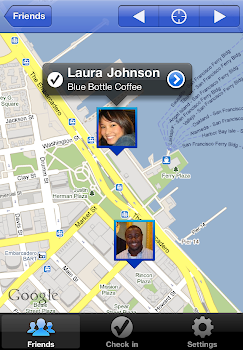

Tap the “Check in” button to start checking in at nearby places. Keep checking in every time you visit your favorite places to start gaining special status there. You’ll not only progress to become a Regular, VIP, and then Guru at your favorite places, but if you’re near Austin, Texas, gaining status lets you unlock check-in offers at over 60 places.
Just like with sharing your location, you can control your Latitude check-in privacy. Checking in is 100% opt-in, and you can choose to share any check-in with your friends on Latitude, publicly on the web and your Google profile, or just yourself.
To start checking in with Latitude on your iPhone, update the Latitude app from the App Store. The app requires iOS 4 and above, and it's available for iPhone 3GS, iPhone 4, iPad, and iPod touch (3rd/4th generation). However, background location updating is only available on the iPhone 3GS, iPhone 4, and iPad 3G.
Google Places in 30 languages
Best ever! Me gusta! Mi piace! Ich liebe es! Wherever you are and whatever language you speak, we want to give you the best personalized place recommendations when you use Google Places with Hotpot. Update the Google Places app from the App Store to rate on the go and get personalized recommendations for places in 30 languages.
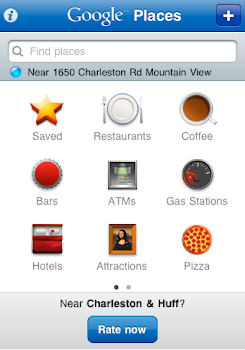

You’ll also have one more way to personalize your experience: saved places. Sign in with your Google Account using the info icon in the top left corner. Then, tap the new “Saved” icon on the app’s main screen to see all the places that you’ve saved or starred from the app, google.com/hotpot or maps.google.com.
Updates will appear in the App Store in supported countries throughout today. Get the latest version of Google Places from the App Store and start discovering great new places wherever you are!
Check in with Google Latitude for iPhone
After adding check-ins to Google Latitude for Android-powered devices, we’re happy to announce that you can now start checking in at places with the updated Latitude app for iPhone.
With Google Latitude, you can see where your Latitude friends are on a map and choose to continuously share where you are. Now, you can also choose to check in at specific places, such as your favorite restaurant or a park, to add more context to your location. You'll be able to not only let friends know that you’re just around the corner but also let them know the actual coffee shop that you’re at in case they want to join you. If Latitude is set to continuously update your location, you’ll also be automatically checked out when you leave. This way, friends aren’t left guessing if you’re still there or not before heading over to join you for a latte.


Tap the “Check in” button to start checking in at nearby places. Keep checking in every time you visit your favorite places to start gaining special status there. You’ll not only progress to become a Regular, VIP, and then Guru at your favorite places, but if you’re near Austin, Texas, gaining status lets you unlock check-in offers at over 60 places.
Just like with sharing your location, you can control your Latitude check-in privacy. Checking in is 100% opt-in, and you can choose to share any check-in with your friends on Latitude, publicly on the web and your Google profile, or just yourself.
To start checking in with Latitude on your iPhone, update the Latitude app from the App Store. The app requires iOS 4 and above, and it's available for iPhone 3GS, iPhone 4, iPad, and iPod touch (3rd/4th generation). However, background location updating is only available on the iPhone 3GS, iPhone 4, and iPad 3G.
Google Places in 30 languages
Best ever! Me gusta! Mi piace! Ich liebe es! Wherever you are and whatever language you speak, we want to give you the best personalized place recommendations when you use Google Places with Hotpot. Update the Google Places app from the App Store to rate on the go and get personalized recommendations for places in 30 languages.


You’ll also have one more way to personalize your experience: saved places. Sign in with your Google Account using the info icon in the top left corner. Then, tap the new “Saved” icon on the app’s main screen to see all the places that you’ve saved or starred from the app, google.com/hotpot or maps.google.com.
Updates will appear in the App Store in supported countries throughout today. Get the latest version of Google Places from the App Store and start discovering great new places wherever you are!
Introducing Nexus S 4G for Sprint
Recently, we introduced Nexus S from Google, the first phone to run Android 2.3, Gingerbread. In addition to the UMTS-capable Nexus S, today we’re introducing Nexus S 4G from Google, available for Sprint. Nexus S 4G is part of the Nexus line of devices which provide a pure Google experience and run the latest and greatest Android releases and Google mobile apps.
We co-developed Nexus S 4G with Samsung to tightly integrate hardware and software and highlight the advancements of Gingerbread. Nexus S 4G takes advantage of Sprint’s high-speed 4G data network. It features a 4” Contour Display designed to fit comfortably in the palm of your hand and along the side of your face. It also features a 1GHz Hummingbird processor, front and rear facing cameras, 16GB of internal memory, and NFC (near field communication) hardware that lets you read information from everyday objects that have NFC tags.
In addition, today we’re excited to announce that Sprint customers will soon be able to take advantage of the full set of Google Voice features without changing or porting their number.
You can find more Nexus S information and videos at google.com/nexus or follow @googlenexus on Twitter for the latest updates. Nexus S 4G can be purchased this spring online and in-store from Sprint retailers and Best Buy and Best Buy Mobile stores in the U.S.
Posted by Andy Rubin, VP of Engineering
Tuesday, March 15, 2011
Google Search app for iPhone—a new name and a new look
If you need to do a Google search on your iPhone or iPod touch it's now faster and easier when you use our redesigned Google Search app, formerly Google Mobile App. If you've been using Google Mobile App for a while, you'll notice that things look different.

First, you’ll see that there are now more ways to interact with the app. When browsing through search results or looking at a webpage, you can swipe down to see the search bar or change your settings. For those who use other Google apps, there’s an Apps button at the bottom of the screen for rapid access to the mobile versions of our products.
We also included a new toolbar that will make it easier for you to filter your results. You can open this toolbar by swiping from left to right — either before you search or once you’ve got your results. If you only want images, just tap “Images,” and the results will update as shown:


The toolbar helps you to get to the right kind of results.
Second, we’ve made it easier to pick up searching where you left off. If you leave the app and come back later, you’ll be able either to start a new search right away (just tap in the search box to type, hit the microphone button to do a voice search or tap on the camera icon to use Google Goggles) or get back to exactly where you were by tapping on the lower part of the page.
Finally, there are a number of improvements we’ve made to everything else you love in the app, including Google Goggles, Voice Search, Search with My Location, Gmail unread counts and more. There's a lot in the app, so we've added a simple help feature to let you explore it. Access this by tapping the question mark above the Google logo.

Download and try Google Search app today; it’s available free from the iTunes App Store. You can also scan the QR code below.


The redesigned home screen of Google Search app.
First, you’ll see that there are now more ways to interact with the app. When browsing through search results or looking at a webpage, you can swipe down to see the search bar or change your settings. For those who use other Google apps, there’s an Apps button at the bottom of the screen for rapid access to the mobile versions of our products.
We also included a new toolbar that will make it easier for you to filter your results. You can open this toolbar by swiping from left to right — either before you search or once you’ve got your results. If you only want images, just tap “Images,” and the results will update as shown:


The toolbar helps you to get to the right kind of results.
Second, we’ve made it easier to pick up searching where you left off. If you leave the app and come back later, you’ll be able either to start a new search right away (just tap in the search box to type, hit the microphone button to do a voice search or tap on the camera icon to use Google Goggles) or get back to exactly where you were by tapping on the lower part of the page.
Finally, there are a number of improvements we’ve made to everything else you love in the app, including Google Goggles, Voice Search, Search with My Location, Gmail unread counts and more. There's a lot in the app, so we've added a simple help feature to let you explore it. Access this by tapping the question mark above the Google logo.

The help screen can be accessed from anywhere in Google Search app.
Download and try Google Search app today; it’s available free from the iTunes App Store. You can also scan the QR code below.

Wednesday, March 9, 2011
Click-to-call emergency information
(Cross-posted from the Google.org blog)
In November 2010, we began displaying relevant emergency phone numbers at the top of the results page for searches around poison control, suicide and other common emergencies in 14 countries. Today, we are making it even easier for you to quickly reach the help you may need by adding click-to-call capabilities for all of these emergency information search results.
We piggybacked on the way that our mobile ads team enabled click-to-call phone numbers in local ads on mobile devices. This capability enables businesses to make it even easier for customers to reach them when those customers search on Internet-enabled mobile devices. The functionality seemed ideal for the emergency information feature.
Previously, mobile users in one of these countries who conducted searches around poison control, suicide and common emergency numbers received a result showing the relevant emergency phone number.
People on mobile will now get the same result, but the phone number will be a link that allows you to dial the number instantly, just by clicking the link.

We hope this addition is a small step that helps connect people with crucial information that they need immediately.
In November 2010, we began displaying relevant emergency phone numbers at the top of the results page for searches around poison control, suicide and other common emergencies in 14 countries. Today, we are making it even easier for you to quickly reach the help you may need by adding click-to-call capabilities for all of these emergency information search results.
We piggybacked on the way that our mobile ads team enabled click-to-call phone numbers in local ads on mobile devices. This capability enables businesses to make it even easier for customers to reach them when those customers search on Internet-enabled mobile devices. The functionality seemed ideal for the emergency information feature.
Previously, mobile users in one of these countries who conducted searches around poison control, suicide and common emergency numbers received a result showing the relevant emergency phone number.
People on mobile will now get the same result, but the phone number will be a link that allows you to dial the number instantly, just by clicking the link.

Now, the poison control result in Spain is click-to-call on a mobile phone
We hope this addition is a small step that helps connect people with crucial information that they need immediately.
Tuesday, March 8, 2011
Instant Previews now available on mobile
(Cross-posted from the Official Google Blog)
For example, if you’re looking for a webpage that has both photos and descriptions, you can use Instant Previews to quickly identify these pages by navigating across the visual search results with a few swipes of your finger. Or perhaps you’re looking for an article, a step-by-step instructions list, or a product comparison chart—with Instant Previews, you can easily spot pages with the right content without having to navigate back and forth between websites and search results. And when the mobile version of a website is available, we’ll show you a preview of the mobile page.


To use Instant Previews on your mobile device, do a search on www.google.com and tap on the magnifying glass next to any search result. A side-by-side comparison view of the webpage previews for the first page of search results will appear. When you find a result you like, tap on the preview to go straight to the website. It’s as easy as finding a recipe for poaching an egg:
You can learn more about Instant Previews for mobile in our Help Center. We hope that you enjoy finding the right result faster with Instant Previews!
Subscribe to:
Posts (Atom)